
In this article 9 sections
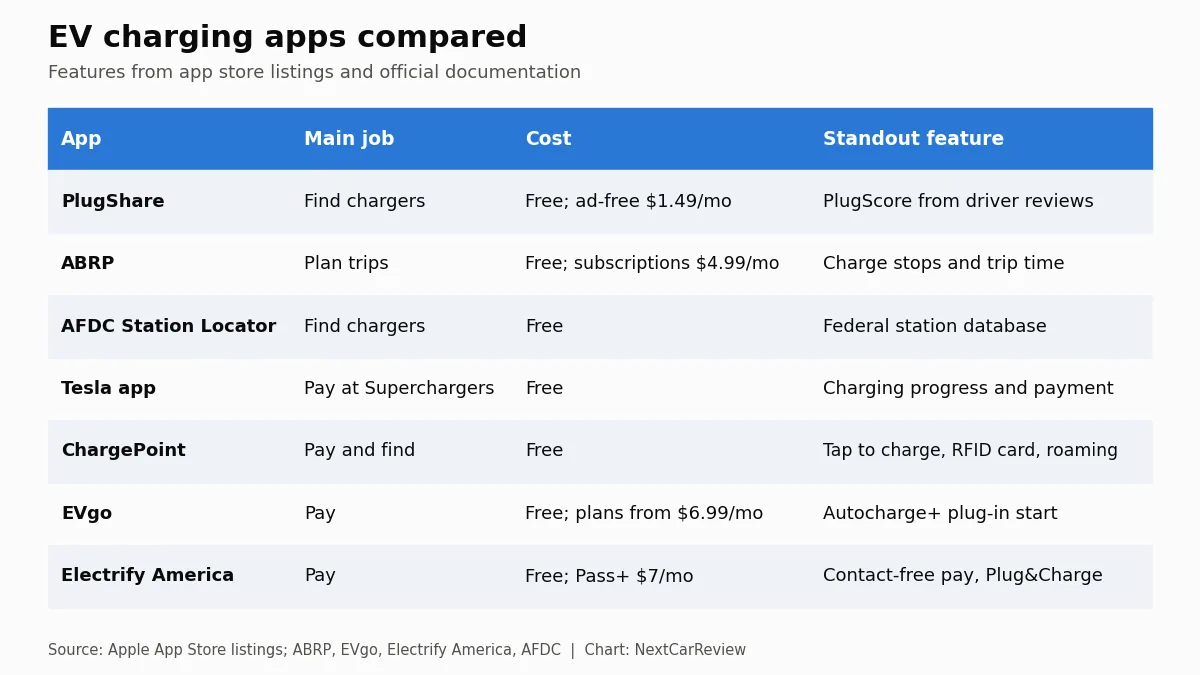
Most U.S. EV drivers are best served by a small kit rather than one perfect app: PlugShare to find chargers and read recent driver check-ins, A Better Routeplanner (ABRP) to plan longer trips around your car’s real range, and the network apps for the one or two networks you actually pay at.
Physical charging cards are now a backup, not a necessity. Electrify America says every one of its fast chargers has a credit and debit card reader, and federally funded NEVI stations must accept contactless card payments without a membership.
App features and prices come from official Apple App Store listings and each company’s own documentation, plus the DOE AFDC Station Locator. This is a features comparison from public documentation, not a test of the apps. NextCarReview does not test chargers or vehicles for this guide; see our sourcing policy.
Your phone does most of the work in public EV charging. It finds the charger, tells you whether it is working, plans your stops, and often pays for the session. No single app does all of that well across every network, which is why it pays to carry a small set.
This guide compares the main U.S. options using their app store listings and official documentation. For the bigger picture on where and how to charge, see our guide to electric vehicle charging stations.
The Three Jobs an EV Charging App Actually Does
- Finder: shows chargers near you or along a route, with connector types, power levels and recent driver reports.
- Planner: builds a trip with charging stops based on your car’s battery, efficiency and the chargers along the way.
- Payment: starts the session and bills you, often with member pricing.
Some apps do a little of everything. The best setups use the strongest app for each job.
Comparison Table
| App | Primary job | Network coverage | Cost | Standout feature |
|---|---|---|---|---|
| PlugShare | Finder | Multi-network, over 200 countries | Free; ad-free $1.49/mo or $14.99/yr | PlugScore from driver reviews; trip planner |
| ABRP | Planner | Multi-network | Free; subscriptions $4.99/mo or $49.99/yr | Full trip plan with charge stops and trip time |
| AFDC Station Locator | Finder | Federal database, all networks | Free | Route mapping; payment types listed |
| Tesla | Payment | Tesla Supercharger | Free app | Real-time charging progress, start and stop |
| ChargePoint | Payment and finder | ChargePoint plus roaming partners | Free app | Tap to charge, RFID card, roaming |
| EVgo | Payment | EVgo | Free app; plans $0 to $12.99/mo | Autocharge+ starts sessions on plug-in |
| Electrify America | Payment | Electrify America | Free app; Pass+ $7/mo | Contact-free payment; Plug&Charge |
PlugShare: Best All-Around Charger Finder
PlugShare’s App Store listing calls it the world’s largest EV driver community, and its company page says it covers more than 200 countries. Its value is the crowd: drivers check in and leave reviews, and the app turns that into a PlugScore rating meant to show at a glance how reliable a charger has been. It also includes a built-in trip planner, Apple CarPlay support and, at participating locations, payment through PlugShare.
The app is free. An optional ad-free subscription costs $1.49 a month or $14.99 a year.
Pros: multi-network coverage; recent driver check-ins reveal broken or blocked stalls; free.
Cons: crowd data is only as current as the last check-in; payment works only at some sites.
A Better Routeplanner (ABRP): Best for Trip Planning
ABRP exists for one job: planning EV road trips. Its App Store listing describes a full trip plan including charge stops and trip duration. The free tier includes optimal route calculation and data-driven models for more than 1,000 EVs, so the plan reflects your car rather than a generic range number. ABRP’s Premium tier adds real-time traffic and weather, live vehicle data, Apple CarPlay and Android Auto, live charger status and drive and charge history. The App Store lists in-app subscriptions at $4.99 a month or $49.99 a year. The app’s listed seller is now Rivian Automotive.
Before a long drive, ABRP is the easiest way to estimate your charging time and the number of stops your trip needs.
Network-Specific Apps (Tesla, ChargePoint, EVgo, Electrify America)
- Tesla: the Tesla app lets you check charging progress in real time and start or stop charging. It is also the gateway for non-Tesla drivers at Superchargers.
- ChargePoint: start sessions with Tap to charge, in the app, or with an RFID card. The listing names roaming at partner networks including FLO, EVgo, Greenlot and EV Connect.
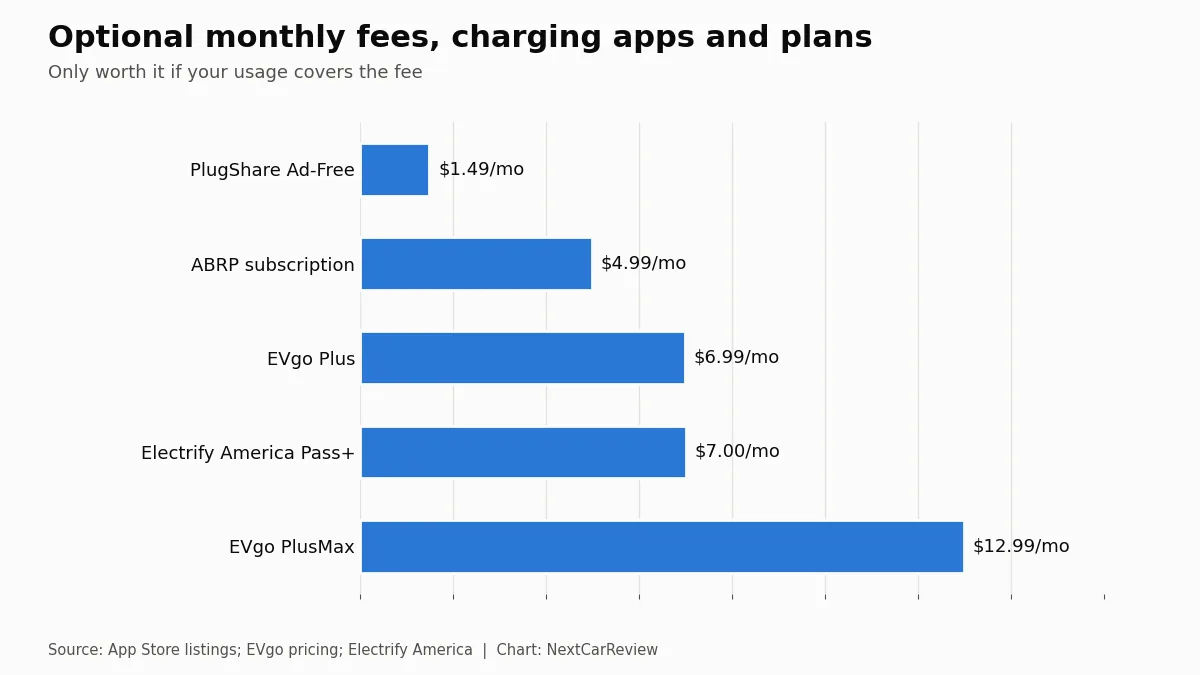
- EVgo: start a session with Autocharge+, the app, an RFID card or a credit card. Autocharge+ starts the session the moment you connect once your car is enrolled. Plans range from Pay As You Go ($0 a month plus a $0.99 session fee) to EVgo Plus ($6.99) and PlusMax ($12.99).
- Electrify America: pay contact-free through the app, and join Pass+ for $7 a month to save about 25%. The company says every fast charger supports Plug&Charge, which uses the ISO 15118 standard to start sessions automatically on compatible cars.
Why you’ll likely need more than one app
Each network app shows its own chargers and its own prices. If you rely on just one, you miss stations on other networks and the driver reports that warn you a site is down. A finder plus your main network apps covers most situations. Our EV charging network comparison shows which networks are worth installing for your area and car.
EV Charging Cards: Do You Still Need One?
For most drivers, no. Payment has moved to apps, credit card readers and automatic plug-in authentication. Electrify America says all of its fast chargers include a credit and debit card chip reader and that a membership is never required. Federal NEVI rules for funded stations go further: they require a contactless payment method that accepts major credit and debit cards, prohibit requiring a membership, and require charger software capable of Plug and Charge under ISO 15118-2.
RFID cards still have a place. ChargePoint and EVgo both support them, and a card works when your phone is dead or has no signal in a parking garage. Think of a card as a cheap backup, not your main tool.
Recommended App Setup by Driver Type
| Driver type | Finder | Planner | Payment apps |
|---|---|---|---|
| Daily commuter who charges at home | PlugShare | Usually not needed | One local network as a backup |
| Apartment dweller using public charging | PlugShare | Optional | ChargePoint plus the nearest DC fast network |
| Road-tripper with a NACS port | PlugShare | ABRP | Tesla plus one CCS network where your car supports it |
| Road-tripper with a CCS port | PlugShare | ABRP | Electrify America and/or EVgo; Tesla if you have an approved adapter |
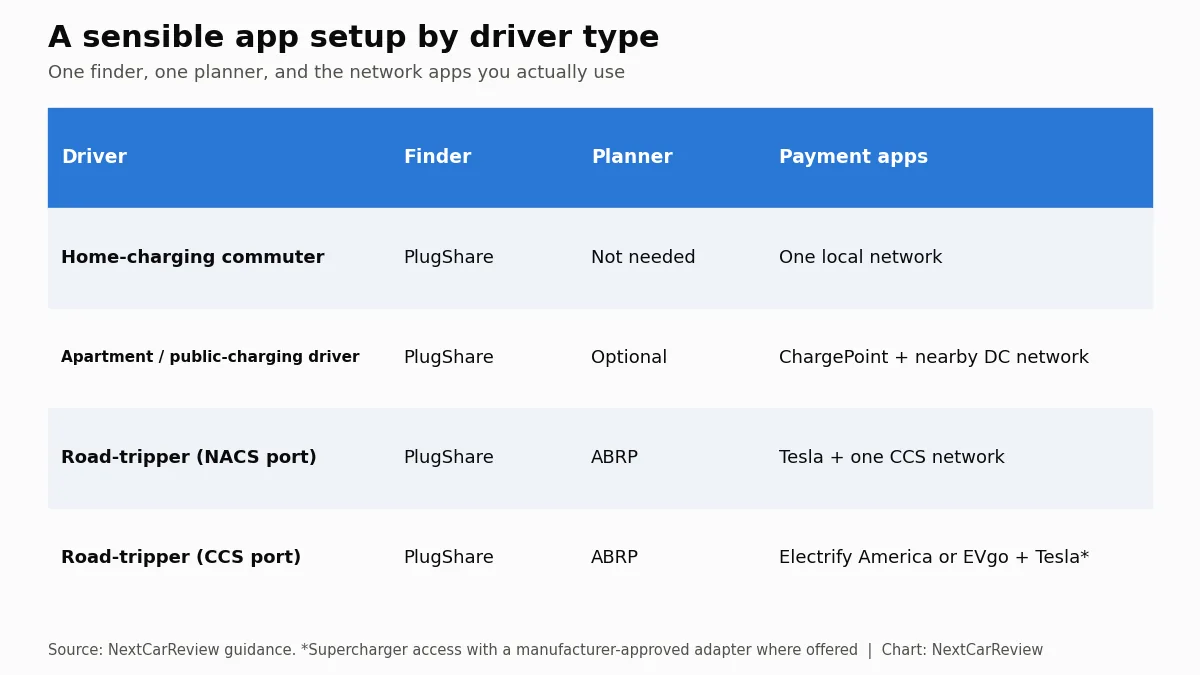
Connector type decides which payment apps are useful. If your car has a CCS port, your automaker’s approved adapter determines whether Superchargers are an option; see our guide to NACS vs CCS adapters.
EV Charging Guide Series
Start with the main guide: choosing and using EV charging stations. More in this series:
- EV charging levels explained: Level 1 vs Level 2 vs DC fast
- How long it takes to charge an electric car
- The Section 30C EV charger tax credit in 2026
- Home vs public EV charging cost per mile
- How to install a Level 2 charger at home
- Best Level 2 home EV chargers compared
- EV charging for renters and apartment dwellers
- Tesla Supercharger vs Electrify America vs EVgo vs ChargePoint
Frequently Asked Questions
What is the best app for finding EV charging stations?
PlugShare is a strong all-around finder that covers many networks. Its App Store listing describes it as the world’s largest EV driver community, with a PlugScore rating based on driver reviews and a built-in trip planner, and it is free. The DOE’s AFDC Station Locator is a solid free alternative backed by federal station data.
Do I need a separate app for each charging network?
Often, yes, at least for the networks you use regularly. Network apps handle payment, membership pricing and features like EVgo’s Autocharge+. Electrify America and EVgo stations also accept credit cards, and ChargePoint’s app supports roaming at several partner networks.
What is the best EV route planning app?
A Better Routeplanner (ABRP) is built specifically for EV trip planning. It produces a full trip plan with charge stops and trip duration, supports more than 1,000 EV models in its free tier, and offers a paid tier with live traffic, weather, vehicle data and live charger status.
Do I still need an EV charging card?
Rarely. Most networks now let you pay in the app, with a credit card, or automatically through Plug&Charge or Autocharge. ChargePoint and EVgo still support RFID cards, which are handy as a backup if your phone has no signal.
Which app do I need for Tesla Superchargers?
The Tesla app. It shows charging progress in real time and lets you start or stop charging. Non-Tesla drivers using Superchargers also go through the Tesla app; check Tesla’s support pages for current requirements.
Are EV charging app subscriptions worth it?
Only if you use them enough. PlugShare’s ad-free option is $1.49 a month, ABRP lists subscriptions at $4.99 a month or $49.99 a year, and network memberships run $6.99 to $12.99 a month at EVgo and $7 at Electrify America. Membership discounts pay off only if your public charging spend is high enough.
⚠️ Professional Notice:
App features and prices are taken from Apple App Store listings and company documentation as of early October 2026 and can change at any time. NextCarReview did not use these apps on trips or test their accuracy. Availability of payment features varies by station.
NextCarReview does not receive compensation from any app developer or charging network for this comparison.
Data Sources and Verification
- PlugShare on the Apple App Store
- PlugShare company page
- A Better Routeplanner on the Apple App Store
- A Better Routeplanner Premium features
- DOE AFDC Station Locator
- Alternative Fueling Stations app (NREL) on the Apple App Store
- Tesla app on the Apple App Store
- ChargePoint app on the Apple App Store
- EVgo app on the Apple App Store
- EVgo pricing plans
- Electrify America app on the Apple App Store
- Electrify America 2025 National Annual Report to EPA (PDF)
- eCFR: 23 CFR Part 680 (NEVI payment and Plug and Charge requirements)
Figures were checked against the sources above in late September and early October 2026. Prices, laws and network data change; verify before you rely on them.

Morgan Reyes is the founder and editor-in-chief of NextCarReview, which Morgan launched in August 2024. A 2022 graduate of Columbia University, Morgan is based in New York and writes and edits the site’s reviews, comparisons and buying guides. Morgan does not road-test vehicles. Every article is built from published primary data: EPA FuelEconomy.gov ratings, NHTSA crash ratings, recalls and owner complaints, IIHS results, and manufacturer specifications and pricing, with each figure cited and checked before publication. Contact: admin@nextcarreview.com